
MoldyRoost: Confiant finds iPhone ads that run Coruna and DarkSword exploits to take seed phrases. Is your iOS version exposed?
Confiant says the MoldyRoost campaign bought ads on more than 480 domains to deliver known iPhone exploit kits to older versions of iOS. You still have to tap the ad; once the landing page opens, no download or further tap is needed. Here is which iOS versions the kits reach, and which updates close them.

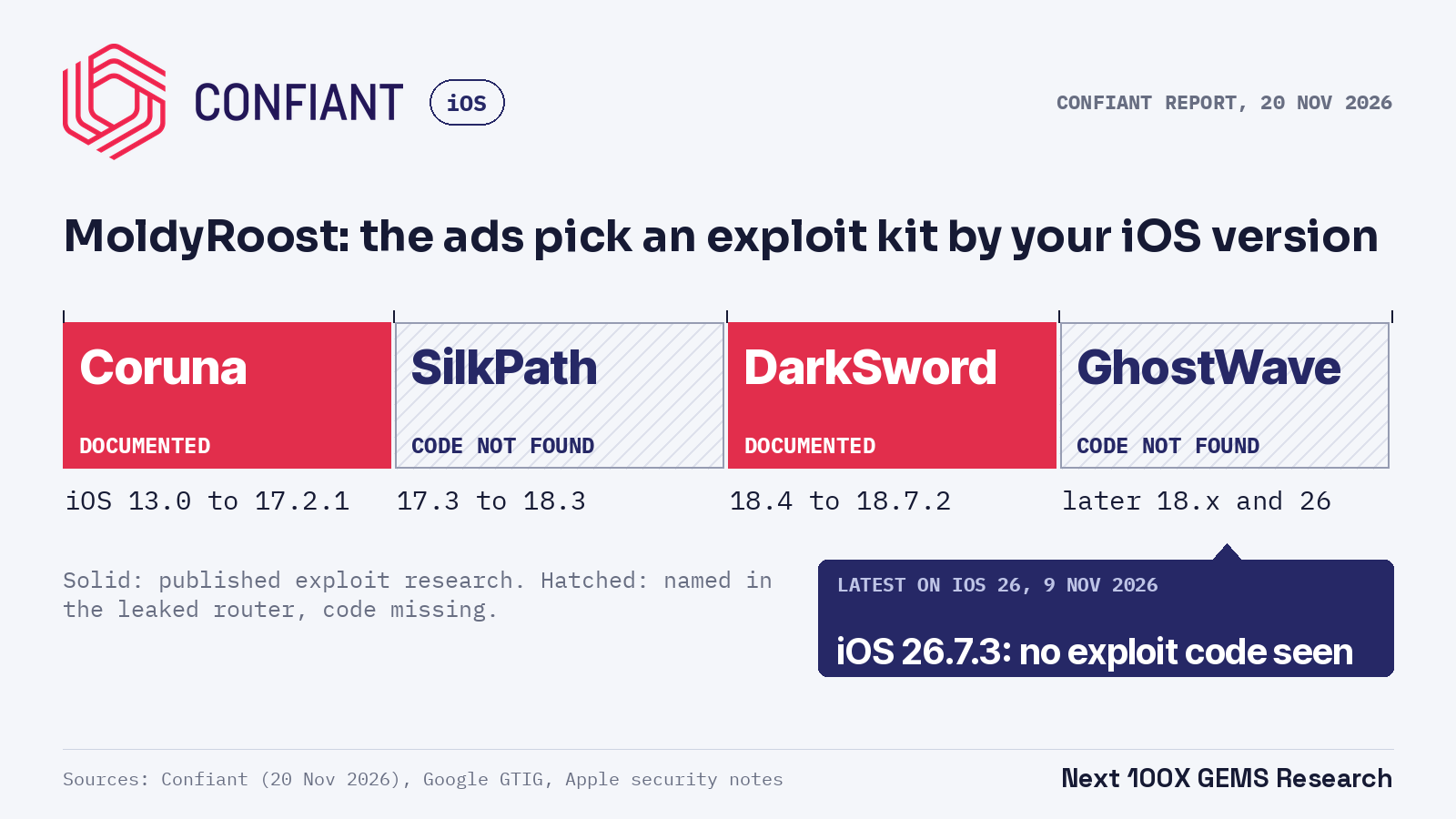
If your iPhone is on a current release of iOS, the exploit kits Confiant found behind the MoldyRoost ads have no documented way in. The phones at risk are the ones running old software. The two kits with published research cover iOS 13.0 to 17.2.1 and iOS 18.4 to 18.7, and Apple had fixed all six bugs in the newer kit by iOS 26.3. Confiant says it has seen no exploit code for iOS 26. Apple's security page, as of 23 November 2026, lists iOS 27.2.1 as the current release, out on 9 November, with iOS 26.7.3 the latest update on the iOS 26 branch. To check yours, open Settings, then General, then Software Update.
What Confiant found
Confiant, which screens online ads for malicious code, published its report on 20 November. Its researchers tied more than 480 ad domains to the campaign between 12 May and 17 November 2026. They split them into six sub-clusters, labelled A to F, and counted more than 47 targeted countries.
The largest, sub-cluster A, had 403 ad domains in 35 countries. Hong Kong saw the most, with 197, followed by Japan with 40, Singapore with 22, the UK with 14, and Turkey and South Korea with 13 each. Many landing pages were copies of real brand sites, such as a clone of Agoda's Hong Kong site. Those brands were impersonated, not involved.
Confiant says MoldyRoost is a separate campaign from the Optimizely supply-chain attack of 16 November, which we covered in How an Optimizely flaw put a crypto address swapper on 178 sites.
Why one tap was enough
Think of a burglar who carries a ring of keys, each cut for one lock model. He reads the brand on your door, picks the matching key and walks in. If you changed the lock last year, none of his keys fit.
MoldyRoost works much the same way. In Confiant's words, "just loading the landing page of a MoldyRoost ad on a vulnerable iPhone is enough to get infected." You still have to tap the ad itself. After that, there is no file to download, no command to paste and no further tap on the page. A hidden frame reads your iOS version, asks a server which kit to use, and starts it while the page loads.
The ads choose who sees the trap. Only an iPhone running Safari gets an exploit chain, and some sub-clusters also target the browsers built into apps. Everyone else gets a working decoy site, an empty frame or a harmless page. A desktop check of the same ad can look clean.
Your iOS version, in one table
Confiant found a leaked copy of the campaign's code. Its selector file assigns every iOS version from 13.0 to 26 to one of four kits. Only two of those kits have published exploit research behind them.
| Your iOS version | Exposed? | What to do |
|---|---|---|
| 13.0 to 17.2.1 | Yes. Routed to Coruna, which Google's threat team documented with 23 exploits for this range | Update to the newest iOS your phone takes. The WebKit fix for CVE-2024-23222 shipped in iOS 17.3 on 22 January 2024 |
| iPhone 6s, 7, SE (1st gen), 8, 8 Plus or X | Yes, unless updated after 11 March 2026 | Install iOS 15.8.7 or 16.7.15 or later. Apple backported Coruna fixes in those releases. Current versions are 15.8.8 and 16.7.16 |
| 17.3 to 18.3 | Not confirmed. Routed to a kit called SilkPath, whose code was missing from the leak | Update anyway |
| 18.4 to 18.7.2 | Yes. Routed to DarkSword, which Google documented for iOS 18.4 to 18.7 | Update to iOS 18.7.7 or later, or move to iOS 26 or 27 |
| Later iOS 18 releases and iOS 26 | No working code seen. Routed to a kit called GhostWave, whose code was also missing | Stay on the newest release: iOS 27.2.1, or 26.7.3 if you remain on iOS 26, or 18.7.12 on iPhone XS and XR |
Apple's notes for iOS 18.7.7 say it widened that update to more devices on 1 April 2026 "so users with Automatic Updates turned on can automatically receive important security protections from web attacks called DarkSword." Google lists the DarkSword bugs, including CVE-2025-43529, CVE-2025-14174 and CVE-2026-20700, as fixed by iOS 26.3.
Confiant is careful here. "We have seen no iOS 26 exploit code, and we cannot say whether any of these branches work," it writes.
What the kits look for
Confiant says the Coruna implant hooks popular wallet apps and hunts for seed phrases written in Apple's notes app and for wallet QR codes in saved images. DarkSword's data miner takes iMessage, WhatsApp and Telegram data, the keychain, saved Wi-Fi passwords, photo metadata, location history and wallet data.
None of this points to a flaw in any wallet app. The kits take over the phone underneath it.
Where the code came from
MoldyRoost did not write these kits. Google's threat team and the security firm iVerify both documented Coruna in March 2026, and Google published its DarkSword analysis later that month. Google traced Coruna from a surveillance vendor's customer to an espionage group and then to financially motivated campaigns, and called it a sign of "an active market for 'second hand' zero-day exploits."
Confiant assesses MoldyRoost as one operation sharing one delivery platform. Whether a single crew runs all six sub-clusters, or rents them out to others, is still undetermined. The commit messages in the leaked code read, Confiant says, "like release notes for a product in production."
If an older iPhone holds your wallet
Start with the update. If your phone cannot update, Google suggests turning on Lockdown Mode, under Settings, then Privacy and Security.
Then think about where your seed phrase lives. Two of the places these kits search are your notes and your photos. A recovery phrase typed into a note, or a screenshot of one, is the thing they were built to find. Paper kept somewhere safe never passes through Safari.
If your phone ran one of the exposed versions, and you remember tapping unfamiliar ads while a phrase sat in a note or photo, treat that phrase as seen. Set up a new wallet on an updated phone, write the new phrase down offline, and move your funds across.
Sources
- Confiant, "MoldyRoost: A Malvertising Machine Built to Deliver iOS Exploits", Roshan and Eliya Stein, 20 Nov 2026: https://blog.confiant.com/p/moldyroost-a-malvertising-machine
- Google Threat Intelligence Group, Coruna iOS exploit kit, 3 Mar 2026: https://cloud.google.com/blog/topics/threat-intelligence/coruna-powerful-ios-exploit-kit
- Google Threat Intelligence Group, DarkSword iOS exploit chain, 18 Mar 2026: https://cloud.google.com/blog/topics/threat-intelligence/darksword-ios-exploit-chain
- Apple, security releases list (checked 23 Nov 2026): https://support.apple.com/en-us/100100
- Apple, security content of iOS 15.8.7, 11 Mar 2026: https://support.apple.com/en-us/126632
- Apple, security content of iOS 16.7.15, 11 Mar 2026: https://support.apple.com/en-us/126646
- Apple, security content of iOS 18.7.7, 24 Mar 2026, widened 1 Apr 2026: https://support.apple.com/en-us/126793
- Apple, security content of iOS 17.3, 22 Jan 2024: https://support.apple.com/en-us/120304
Next 100X GEMS Research
A crypto community active since 2021, focused on helping newcomers spot scams and understand the market.
How we work